Search is quietly becoming answer. A growing share of people never reach a page of blue links. They ask an assistant, read the synthesized reply, and act on it. If a model cannot fetch your site, cannot parse it, or cannot decide what it means, you are not in the running, no matter how good the page looks to a human.
The work to fix that is not mysterious, and it is not tied to any platform or framework. It is a short, concrete checklist. I just took a brand-new site from invisible to cited by working through every item below, so this is the field version, with the exact files and schema, not a theory post.
The order matters. The first item is the one almost everyone gets wrong, and it can quietly cancel out all the others.
1. Let the crawlers in
You can do everything else on this list perfectly and still be invisible if the front door is locked. Two layers control that door, and they disagree more often than you would think.
The first layer is robots.txt. Most sites that want AI visibility should allow everything and name the AI crawlers explicitly so the intent is unambiguous. Allowing them by default is fine; naming them is clearer.
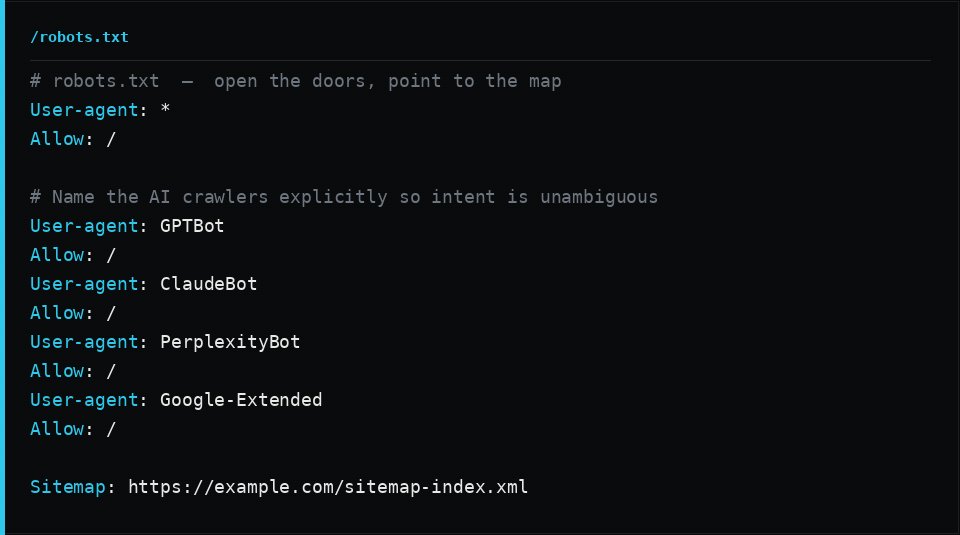
The second layer is the one that bites. Your CDN or host sits in front of your origin, and in the last couple of years most of them shipped a one-click feature that blocks “AI scrapers and crawlers.” On many platforms it is on by default for new sites. It works at the edge, before your robots.txt is ever consulted, and it returns a 403 or 429 to the exact user-agents you are trying to court. Your robots.txt says “come in.” The edge says “no.” The edge wins.
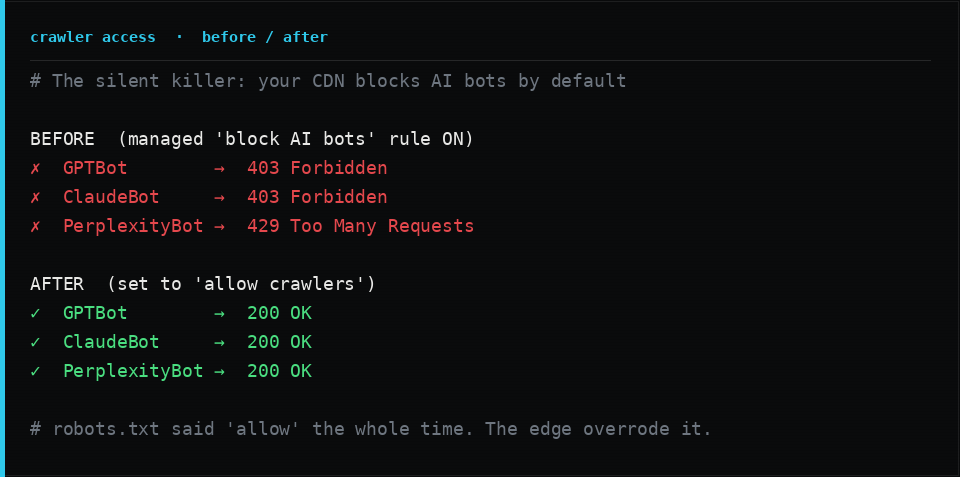
This is the single highest-leverage fix on the page. Check your CDN or host security settings for anything named “block AI bots,” “AI scrapers and crawlers,” or a “managed robots.txt” that rewrites yours, and turn the blocking off (or scope it precisely). Then verify it, because dashboards lie. Send a real request with a bot user-agent and confirm you get a 200 with real HTML, not a challenge page:
curl -A "GPTBot" -I https://yourdomain.com/
# expect: HTTP/2 200   (not 403, 429, or a JS challenge)
Do the same for ClaudeBot, PerplexityBot, OAI-SearchBot, and CCBot. If any come back blocked, you found your problem.
2. Publish an llms.txt
llms.txt is an emerging convention: a small Markdown file at the root of your site that hands an AI assistant a clean, factual summary of who you are plus a curated map of your most important pages. Think of it as a README for machines. It is optional, but it is cheap to write and it measurably improves how accurately a model describes and links you.
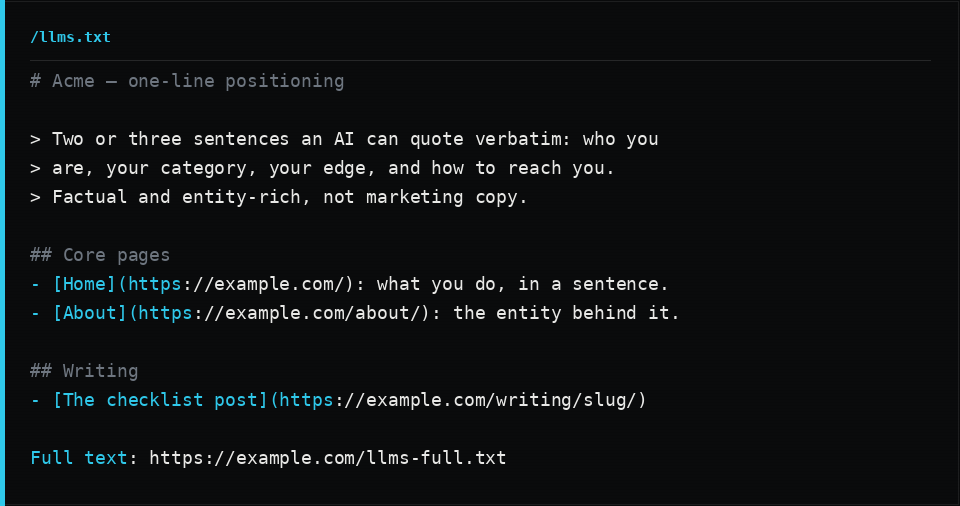
Keep the summary factual and entity-rich. State who you are, your category, your differentiators, and how to reach you, in sentences a model can quote verbatim. Then link your key pages with one-line descriptions. If you publish long-form content, add a companion llms-full.txt that concatenates the full text of those pages, so a model can ingest everything in one fetch. Generate it from your content so it never goes stale.
3. Make your content survive crawling
Here is the assumption that breaks more sites than any other: most AI crawlers do not run JavaScript. Retrieval and training crawlers tend to fetch the raw HTML and move on. If your headline, your body copy, and your key facts are injected by client-side JavaScript after load, a human with a browser sees a rich page and the crawler sees an empty shell.
The fix is to server-render or statically generate your pages so the meaningful content is in the HTML on first response. Test it the way a crawler sees it: disable JavaScript in your browser, or curl the URL, and confirm the actual words are there.
While the content is in the HTML, make it easy to parse:
- One
<h1>per page, then a logical<h2>and<h3>outline with no skipped levels. A jump from<h1>straight to<h3>tells a parser the structure is broken. - Real semantic landmarks:
header,nav,main,article,section,footer. They are how a machine finds the content and ignores the chrome. - Descriptive
alttext on images, and text equivalents for anything important that lives inside a graphic. - Self-contained sentences for your key claims. Write facts that can be lifted out and quoted without the surrounding design. “We doubled a $2B business’s new-customer revenue in eleven months” is extractable. A number floating next to an icon is not.
4. Add structured data
Semantic HTML tells a machine where your content is. Structured data tells it what your content means. JSON-LD is the format every engine reads, and it is the highest-leverage thing you can add after unblocking the crawlers.
Start with a site-wide identity graph: a Person or Organization, plus a WebSite, defined once and linked by @id so every page references the same canonical entity instead of redefining it. This is what lets an engine say “all of these pages are the same Jane Doe” with confidence.
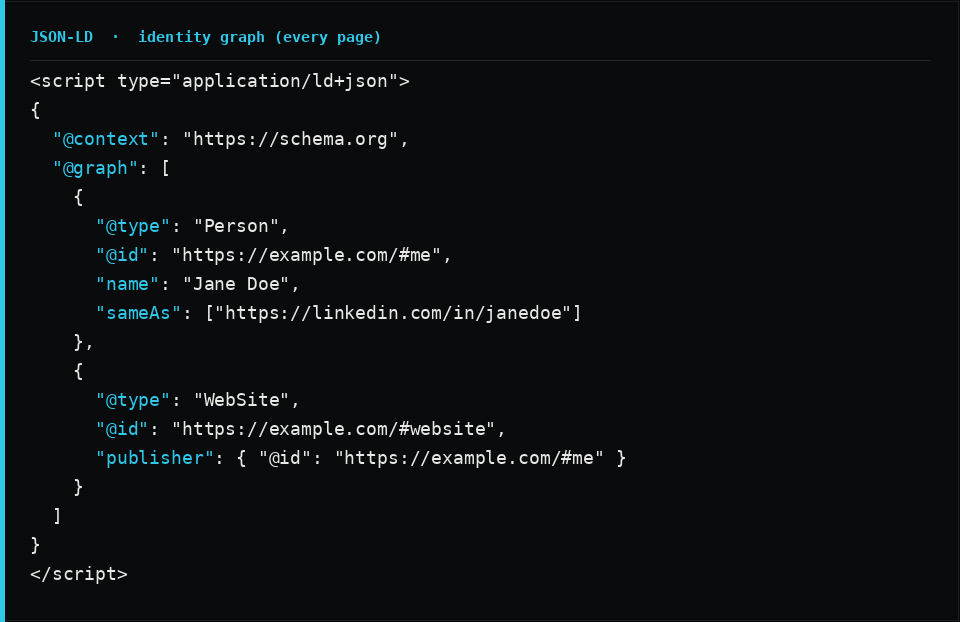
Then give every page its own node typed correctly: WebPage as the baseline, ProfilePage for an about page, ContactPage for contact, CollectionPage for an index, and Article or BlogPosting for posts. On articles, link the author and publisher back into the identity graph by @id, and always include an image, a datePublished, and a dateModified.
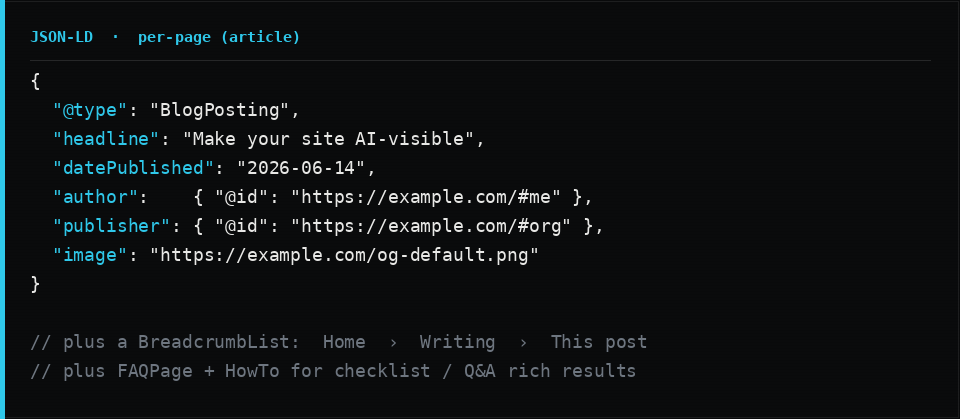
Two additions punch above their weight for discovery. A BreadcrumbList gives engines your hierarchy. And FAQPage (plus HowTo for step-by-step content like this checklist) maps your content into exactly the question-and-answer and step shapes that answer engines love to lift.
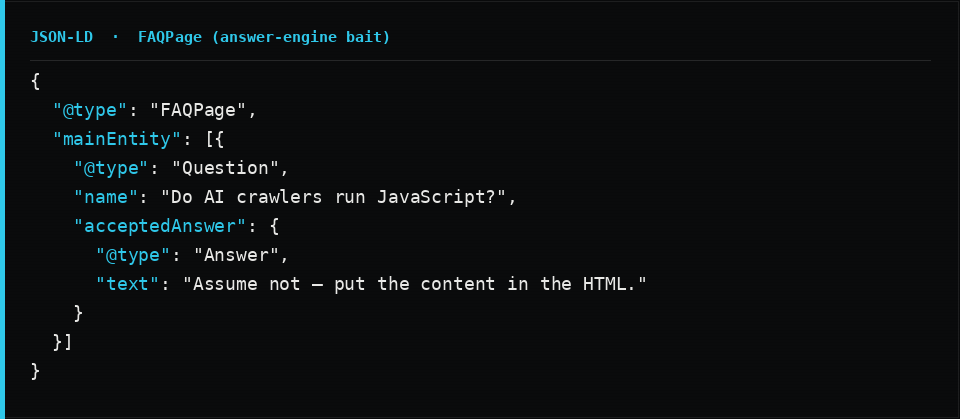
A warning worth stating: the schema has to match what is visible on the page. Marking up questions a user cannot see, or claims you do not make, is the fastest way to get ignored or penalized. This very article carries Article, BreadcrumbList, HowTo, and FAQPage schema, and every one of them mirrors content you can actually read here.
5. Be quotable for answer engines
When an assistant decides whether to cite you, and how your link looks when it does, a handful of head-tags do the work:
- A unique, descriptive
<title>and a unique meta description per page. Factual, not clickbait. - Open Graph and Twitter Card tags, including a 1200x630 image. These control how your URL renders when an AI or a human shares it, and a clean unfurl earns clicks.
- A self-referential
<link rel="canonical">so there is no ambiguity about the real URL. Do not point a canonical at a URL that redirects somewhere else. - Freshness signals, both the visible date and the
dateModifiedin your schema. Answer engines favor content that is demonstrably current.
6. Give the map
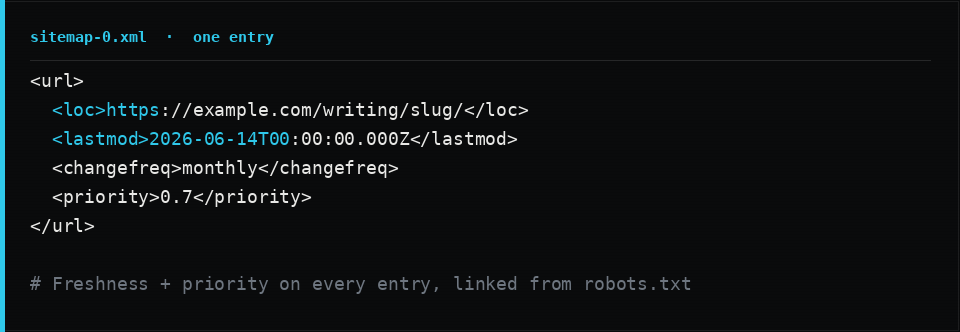
A sitemap is how a crawler discovers everything it would otherwise have to guess at. Publish an XML sitemap, list every public page in it, reference it from robots.txt, and put a lastmod on each entry so engines know what changed and when.
If you migrated or renamed anything, make sure the old URLs 301 to their new homes rather than 404. Dead links and soft-404s that return a 200 on a missing page both erode how much of your site a crawler trusts and keeps.
7. Establish the entity
Discovery gets you read. Authority gets you cited. AI answer engines, like search before them, weigh who is saying something, not just what is said.
- Use one consistent name and identifier for the entity, on the page, in the schema, and in
llms.txt. Inconsistency forces a model to guess, and it will guess wrong. - Link authoritative profiles with
sameAs: LinkedIn, an org page, a Crunchbase or Wikipedia entry if you have one. This is how a model disambiguates you from everyone who shares your name. - Make authorship and expertise explicit, and attribute or source your claims. Self-contained, verifiable statements are the ones that get repeated.
8. Measure and re-check
You cannot improve what you do not test. After the changes are live:
- Re-fetch with bot user-agents and confirm 200s with real HTML, per item 1.
- Validate the schema against a structured-data validator and fix every error, not just the warnings.
- Query the answer engines themselves. Ask an assistant about your brand and about the category question you want to own, and read the result critically. Are you cited? Is the description accurate and current, or is the model repeating stale or wrong facts? Misattribution is a fixable problem once you can see it.
Then put this on a cadence. The crawlers, the conventions, and the engines all move. A site that was perfectly visible six months ago can be quietly dropped by a default someone flipped at your CDN.
The ten-minute version
If you do nothing else, do these:
- Confirm your CDN or host is not blocking AI crawlers. Verify with
curl -A "GPTBot". - Allow AI agents in
robots.txtand link your sitemap. - Make sure your real content is in the HTML, not JavaScript-only.
- Add a linked JSON-LD identity graph plus per-page
Article,BreadcrumbList, andFAQPage. - Publish an
llms.txt. - Ship a sitemap with
lastmod, fix your redirects, and add Open Graph tags. - Re-fetch as a bot, validate the schema, and ask an AI what it thinks you do.
None of this is exotic. It is hygiene for a web where the most important reader of your site is increasingly not a person. Get the door open, make the content legible, label what it means, and prove who is behind it. The engines will do the rest.
FAQ
Do AI crawlers run JavaScript? Assume they do not. Many retrieval and training crawlers fetch raw HTML and never execute your scripts, so anything injected only by client-side JavaScript is invisible to them. Server-render or statically generate your content.
Is robots.txt enough to allow AI crawlers? No. robots.txt states your intent, but most CDNs and hosts now ship a one-click block-AI-bots feature that returns 403 at the edge regardless of what robots.txt says. Always verify with a live request using a bot user-agent.
What is llms.txt and do I need it? It is an emerging convention, a Markdown file at /llms.txt, that gives AI assistants a clean factual summary and a curated map of your most important pages. It is optional but cheap, and it improves how accurately models describe and cite you.
Does structured data help with AI search specifically? Yes. JSON-LD removes ambiguity about who you are and what each page is, which helps both traditional rich results and AI answer engines extract and attribute facts correctly. A linked identity graph plus per-page Article, FAQ, and Breadcrumb schema is the high-leverage set.
How do I know if it worked? Re-fetch key pages with AI bot user-agents and confirm a 200 with real HTML, validate your schema, and query AI answer engines for your brand and category to see whether you are cited and described accurately.